HELP - Workers not pooling for task. Task queue are decreasing in workers until 0

We are facing the same issue that is commented in this topic: Workers not polling for tasks

We are trying to identify the root cause of the issue in our case. We haven’t found yet.

We are using python sdk 1.18.1. with all default values provided by sdk 1.18.1 here: https://github.com/temporalio/sdk-python/blob/1.18.0/temporalio/worker/\_worker.py

“The number of task slots available keep reducing continuously without increase in load, the number of pollers of task queue are also less than the number of pods running. When we restart the k8s deployment where workers are running, the slots become available.” We can’t see all the workers that is running in k8s and after a while they start to disappear. After a couple of hours all the workers (around 40) disappear and we need to manually restart all the pods to back online. The pods are bigger than usual. 6GB and 4 CPU each one.

Do you have any help to try to identify the root cause? we don’t have code blocking the activities and workflows.

Typically with this description you gave, especially along with

When we restart the k8s deployment where workers are running, the slots become available.

indicates that something in activity code is blocking (most of time have seen related to some connection or waiting for response from a downstream) that causes activity timeouts and retries.
Can also be high worker cpu that then slows down compute, again leading to activity timeouts.

Do you have worker (sdk) metrics? Do you have your worker pod resource utilization metrics?

@tihomir

We have checked the code and we didn’t found any code blocking. We have been working with async calls to avoid any blocking. Today we have found an interesting information that i want to share with you maybe it could be helpful. This is a pod that was missing from UI and we can see that the workflowsWorkers (Activity task slots are fine) slots decreased at the same time that it was missing. Workflow worker available slots almost or completely depleted, while plenty of available slots for the activity worker.

we tracked it down, its fbl-workflows-55458df9c7-w8797 and the symptom is the dead i/o you see here and dead cpu usage. We have lost all the workflows worker task slots however we can see that the pod performance all the time was fine. (CPU, Memory and Networking)

@tihomir I can add other information that could be helpful.

based on this article: How To Identify And Tune Worker Bottlenecks - #3 by sriramg

and this one: Performance bottlenecks troubleshooting guide | Temporal Platform Documentation

We have raised the max_concurrent_workflow_tasks from 100 to 500. We have seen that the same behavior happened with 500 as well.

In the last graph, we can see that as the workflow workers go down to zero, the activity workers go down a little as well (from 100 to 90).

We verified that the performance of the affected pod at the time of the depletion was very good, in terms of CPU and memory usage.

Do you have any recommendation? Thanks in advance!

@tihomir Let me know if that information is enough. Thanks!!

@tihomir @maxim

Another example of today!

After 02 PM (14:00), our worker fbl-workflows-856df87ccc-gd97h disappeared from temporal UI.

After 02 PM (14:00), our worker fbl-workflows-856df87ccc-gd97h disappeared from temporal UI.

I think its expected in this case. When all workflow task slots on worker are occupied, worker stops polling (PollWorkflowTaskQueue). UI on task queue page uses DescribeTaskQueue api which is basically a 2 min “sliding window”, so if server detects no pollers in last 2mins it would not show that worker.

Can you please share your worker config for this task queue?
Can you correlate the times when you see available worker task slots going to 0 with any specific operations on server metrics side -

sum by(operation) (rate(service_requests{service_name="frontend"}[1m]) or on () vector(0))

sum by(operation) (rate(service_errors{service_name="frontend"}[1m]) or on () vector(0))

maybe gives some indication of specific operation that could be causing issue to start happening.
also from sdk worker metrics can you share
temporal_request_failure metric per operation and status_code please?

We have checked the code and we didn’t found any code blocking

Ok if thats the case where activities do not block event loop, can you just try to eliminate edge cases
like any logging statements (especially if you use distributed logging) / custom metrics dispatch / data converters / codecs that might be calling any downstream services
and see if it could be that those things are blocking?

Just to add, if its easier for you to go through this over zoom, try booking a session and we can do that, links:

1hr session signup
30min session signup

1 Like

@tihomir I am going to try to collect all the information that you asked. Thanks a lot for your support and Help. :grinning_face:

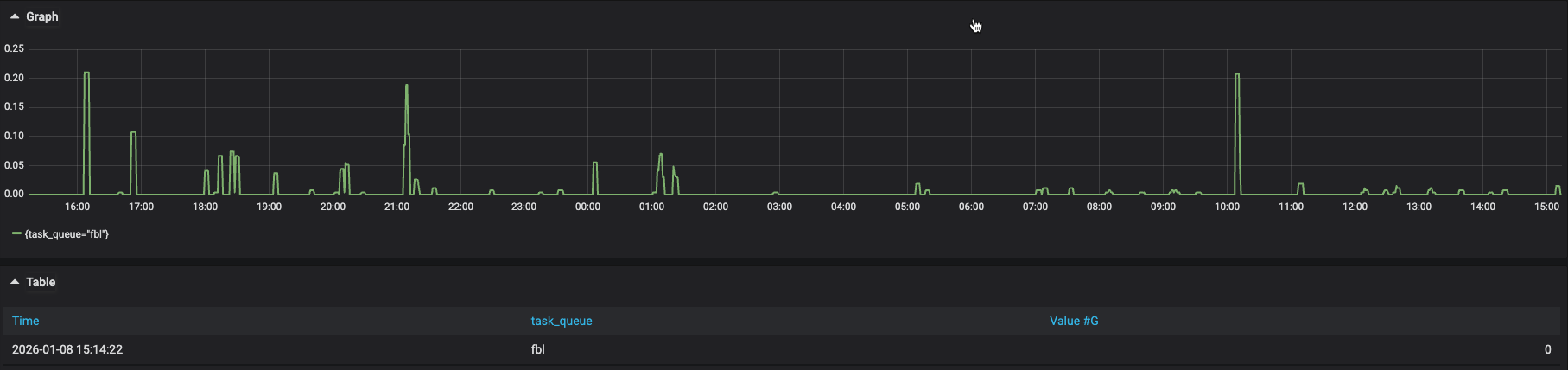
Here I have some queries results that you asked (Last 24 Hours).

Metrics from temporal server

sum by(operation) (rate(service_requests{service_name=“frontend”,namespace=“platform-temporal-shadow”}[1m]) or on () vector(0))

sum by(operation) (rate(service_errors{service_name=“frontend”,namespace=“platform-temporal-shadow”}[1m]) or on () vector(0))

Trying to correlate the times that when a worker task slots going to 0. We have lost 3 workers at (21, 06 and 11)

We could say that when we lose a worker we can see an Failed “PollWorkflowsExecutionHistory”.

Metrics for sdk workers

sum by (operation, status_code) (
rate(
temporal_request_failure{
namespace=“voltron-alpha”
}[5m]
)
)

Would be useful to see error type -
sum by (operation,error_type) (rate(service_error_with_type{service_name="frontend", namespace="..."}[1m]))

Metrics for sdk workers

temporal_request_failure shows Unavailable and DEADLINE_EXCEEDED, cant tell from graph which colors are associated with what, can you help me with this please?

can we just try to look at cache evictions before your worker slots avail go to 0?
sdk metric temporal_sticky_cache_total_forced_eviction

One thing stand out maybe from your graph https://us1.discourse-cdn.com/flex016/uploads/temporal/optimized/2X/6/6a9b78c37f2b142e54f3eb117bd2ae8baf5149f5_2_1380x506.png

these graphs line up meaning as your worker picks up more activities, your workflow task executor slots do seem to start blocking…sorry but im still not 100% sure that its not something in activity code blocking event loop :frowning:

If your workers processing both activities and workflows, can we try to separate, meaning run activities on completely diff task queue and have activity-only workers and see if this happens again with workflow workers? could try to eliminate this possiblity.

@tihomir

I have limited the time range to our first worker lost. (06).

sum by (operation, status_code) (
increase(
temporal_request_failure{
namespace=“voltron-alpha”
}[5m]
)
) > 0

I have change the time range from 04:30 to 08:30.

sum by (task_queue) (
rate(
temporal_sticky_cache_total_forced_eviction{
namespace=“voltron-alpha”
}[5m]
)
) or on () vector(0)

I didn’t know that, I though that there was one task queue shared for both activities and workflows. It would be a great idea!


would be interesting to understand if these unavailable responses are coming back from your grpc proxy/lb or from server directly
if from server directly and at that rate especially for RespondWorkflowTaskCompleted can indicate server stability issues. can you check shard movement server metrics:

sum(rate(sharditem_created_count{service_name=”history”}[1m]))
sum(rate(sharditem_removed_count{service_name=”history”}[1m]))
sum(rate(sharditem_closed_count{service_name=”history”}[1m]))

I though that there was one task queue shared for both activities and workflows.

from user point of view a worker they start just points to task queue “X”, internally its workflow task queue, activity task queue, and worker-specific (sticky) task queue
sorry if already clear but idea is that in workflow code you explicitly configure task queue thats different than one where you start your executions on that schedule activities
then set up activity workers for this new task queue that only have activities registered

@tihomir I have run the promql query that you ask me for the last 2 days. Thanks!.

@tihomir We have found two kinds of potential deadlocks, Do you think that those could be related?

Traceback (most recent call last):
File "/usr/local/lib/python3.11/typing.py", line 385, in <genexpr>
ev_args = tuple(_eval_type(a, globalns, localns, recursive_guard) for a in t.__args__)

File "/usr/local/lib/python3.11/typing.py", line 385, in _eval_type
ev_args = tuple(_eval_type(a, globalns, localns, recursive_guard) for a in t.__args__)
^^^^^^^^^^^^^^^^^^^^^^^^^^^^^^^^^^^^^^^^^^^^^^^^^^^^^^^^^^^^^^^^^^^^^^^^^^^^
File "/usr/local/lib/python3.11/typing.py", line 2336, in get_type_hints
value = _eval_type(value, base_globals, base_locals)
^^^^^^^^^^^^^^^^^^^^^^^^^^^^^^^^^^^^^^^^^^^^
File "/usr/local/lib/python3.11/site-packages/temporalio/converter.py", line 1632, in value_to_type
field_hints = get_type_hints(hint)
^^^^^^^^^^^^^^^^^^^^
File "/usr/local/lib/python3.11/site-packages/temporalio/converter.py", line 594, in from_payload
obj = value_to_type(type_hint, obj, self._custom_type_converters)
^^^^^^^^^^^^^^^^^^^^^^^^^^^^^^^^^^^^^^^^^^^^^^^^^^^^^^^^^^^
File "/usr/local/lib/python3.11/site-packages/temporalio/converter.py", line 311, in from_payloads
values.append(converter.from_payload(payload, type_hint))
^^^^^^^^^^^^^^^^^^^^^^^^^^^^^^^^^^^^^^^^^^
File "/usr/local/lib/python3.11/site-packages/temporalio/worker/_workflow_instance.py", line 1990, in _convert_payloads
return self._payload_converter.from_payloads(
^^^^^^^^^^^^^^^^^^^^^^^^^^^^^^^^^^^^^^
File "/usr/local/lib/python3.11/site-packages/temporalio/worker/_workflow_instance.py", line 1025, in _make_workflow_input
args = self._convert_payloads(init_job.arguments, arg_types)
^^^^^^^^^^^^^^^^^^^^^^^^^^^^^^^^^^^^^^^^^^^^^^^^^^^^^
File "/usr/local/lib/python3.11/site-packages/temporalio/worker/_workflow_instance.py", line 405, in activate
self._workflow_input = self._make_workflow_input(start_job)
^^^^^^^^^^^^^^^^^^^^^^^^^^^^^^^^^^^^
File "/usr/local/lib/python3.11/site-packages/temporalio/worker/_workflow.py", line 683, in activate
return self.instance.activate(act)
^^^^^^^^^^^^^^^^^^^^^^^^^^^
File "/usr/local/lib/python3.11/concurrent/futures/thread.py", line 58, in run
result = self.fn(*self.args, **self.kwargs)
^^^^^^^^^^^^^^^^^^^^^^^^^^^^^^^^^^
File "/usr/local/lib/python3.11/concurrent/futures/thread.py", line 83, in _worker
work_item.run()
File "/usr/local/lib/python3.11/threading.py", line 975, in run
self._target(*self._args, **self._kwargs)
File "/usr/local/lib/python3.11/threading.py", line 1038, in _bootstrap_inner
self.run()
File "/usr/local/lib/python3.11/threading.py", line 995, in _bootstrap
self._bootstrap_inner()
File "/usr/local/lib/python3.11/site-packages/debugpy/_vendored/pydevd/_pydev_bundle/pydev_monkey.py", line 1134, in __call__
ret = self.original_func(*self.args, **self.kwargs)
^^^^^^^^^^^^^^^^^^^^^^^^^^^^^^^^^^^^^^^^^^^^^
temporalio.worker._workflow._DeadlockError: [TMPRL1101] Potential deadlock detected: workflow didn't yield within 2 second(s).
level: ERROR
message: Failed handling activation on workflow with run ID 019bb80a-1d5d-763f-a735-325c62fabd6f
name: temporalio.worker._workflow
timestamp: 2026-01-13T15:47:11Z

Traceback (most recent call last):
File "/usr/local/lib/python3.11/_weakrefset.py", line 39, in _remove
def _remove(item, selfref=ref(self)):

File "/usr/local/lib/python3.11/site-packages/dataclasses_json/core.py", line 362, in _decode_items
return list(_decode_item(type_args, x) for x in xs)
^^^^^^^^^^^^^^^^^^^^^^^^^^^^^^^^^^^^^^^^^^^^
File "/usr/local/lib/python3.11/site-packages/dataclasses_json/core.py", line 288, in _decode_generic
xs = _decode_items(_get_type_arg_param(type_, 0), value, infer_missing)
^^^^^^^^^^^^^^^^^^^^^^^^^^^^^^^^^^^^^^^^^^^^^^^^^^^^^^^^^^^^^^^^^^
File "/usr/local/lib/python3.11/site-packages/dataclasses_json/core.py", line 219, in _decode_dataclass
init_kwargs[field.name] = _decode_generic(field_type,
^^^^^^^^^^^^^^^^^^^^^^^^^^^
File "/usr/local/lib/python3.11/site-packages/dataclasses_json/api.py", line 70, in from_dict
return _decode_dataclass(cls, kvs, infer_missing)
^^^^^^^^^^^^^^^^^^^^^^^^^^^^^^^^^^^^^^^^^^
File "/source/fbl-workflows/src/voltron/fbls/explanation_pipeline/workflows/explanation_hold.py", line 358, in get_forensics_metadata
return RetrieveForensicsMetadataOutput.from_dict(result)
^^^^^^^^^^^^^^^^^^^^^^^^^^^^^^^^^^^^^^^^^^^^^^^^^
File "/source/fbl-workflows/src/voltron/fbls/explanation_pipeline/workflows/explanation_hold.py", line 382, in run_add_workflow
buffer_result: Optional[RetrieveForensicsMetadataOutput] = await self.get_forensics_metadata(origin, source, theater)
^^^^^^^^^^^^^^^^^^^^^^^^^^^^^^^^^^^^^^^^^^^^^^^^^^^^^^^^^^
File "/source/fbl-workflows/src/voltron/fbls/explanation_pipeline/workflows/explanation_hold.py", line 333, in process_forensics
result.append(await self.run_add_workflow(ThreatType.EMAIL, process_forensics))
^^^^^^^^^^^^^^^^^^^^^^^^^^^^^^^^^^^^^^^^^^^^^^^^^^^^^^^^^^^^^^^^
File "/source/fbl-workflows/src/voltron/fbls/explanation_pipeline/workflows/explanation_hold.py", line 256, in run
jobs.extend([x for x in await self.process_forensics(forensics) if x])
^^^^^^^^^^^^^^^^^^^^^^^^^^^^^^^^^^^^^^^
File "/usr/local/lib/python3.11/site-packages/temporalio/worker/_workflow_instance.py", line 2578, in execute_workflow
return await input.run_fn(*args)
^^^^^^^^^^^^^^^^^^^^^^^^^
File "/usr/local/lib/python3.11/site-packages/temporalio/worker/_workflow_instance.py", line 986, in run_workflow
result = await self._inbound.execute_workflow(input)
^^^^^^^^^^^^^^^^^^^^^^^^^^^^^^^^^^^^^^^^^^^
File "/usr/local/lib/python3.11/site-packages/temporalio/worker/_workflow_instance.py", line 2194, in _run_top_level_workflow_function
await coro
File "/usr/local/lib/python3.11/asyncio/events.py", line 80, in _run
self._context.run(self._callback, *self._args)
File "/usr/local/lib/python3.11/site-packages/temporalio/worker/_workflow_instance.py", line 2171, in _run_once
handle._run()
File "/usr/local/lib/python3.11/site-packages/temporalio/worker/_workflow_instance.py", line 418, in activate
self._run_once(check_conditions=index == 1 or index == 2)
File "/usr/local/lib/python3.11/site-packages/temporalio/worker/_workflow.py", line 683, in activate
return self.instance.activate(act)
^^^^^^^^^^^^^^^^^^^^^^^^^^^
File "/usr/local/lib/python3.11/concurrent/futures/thread.py", line 58, in run
result = self.fn(*self.args, **self.kwargs)
^^^^^^^^^^^^^^^^^^^^^^^^^^^^^^^^^^
File "/usr/local/lib/python3.11/concurrent/futures/thread.py", line 83, in _worker
work_item.run()
File "/usr/local/lib/python3.11/threading.py", line 975, in run
self._target(*self._args, **self._kwargs)
File "/usr/local/lib/python3.11/threading.py", line 1038, in _bootstrap_inner
self.run()
File "/usr/local/lib/python3.11/threading.py", line 995, in _bootstrap
self._bootstrap_inner()
File "/usr/local/lib/python3.11/site-packages/debugpy/_vendored/pydevd/_pydev_bundle/pydev_monkey.py", line 1134, in __call__
ret = self.original_func(*self.args, **self.kwargs)
^^^^^^^^^^^^^^^^^^^^^^^^^^^^^^^^^^^^^^^^^^^^^
temporalio.worker._workflow._DeadlockError: [TMPRL1101] Potential deadlock detected: workflow didn't yield within 2 second(s).
level: ERROR
message: Failed handling activation on workflow with run ID 3b002ea5-1cb0-4cba-b14f-a91afbb8b2e5
name: temporalio.worker._workflow
timestamp: 2026-01-13T14:36:45Z